What is Import Leads in Salesgem?
Import Leads in Salesgem allows businesses to add multiple lead records to the CRM at once, instead of entering each lead manually. This is especially useful when a business already has lead information stored in an Excel or CSV file and wants to bring that data into Salesgem for further management and follow-up.
How is Import Leads useful to a business?
For example, suppose a real estate company has 1,000 customer enquiries stored in an Excel file containing details such as name, phone number, email address, location, and property interest. Instead of entering all 1,000 leads one by one, the company can import the file into Salesgem and add the leads in bulk.
Once the leads are imported, the sales team can assign them to users, update lead statuses, add sales activities, create follow-up tasks, and manage them through the sales pipeline. For example, the company can import all previous enquiries and assign them to different sales representatives based on location or team. This saves time, reduces manual data entry, and helps the business quickly start managing existing leads within Salesgem.
Steps:
- Log in to Salesgem.
- Go to Leads.
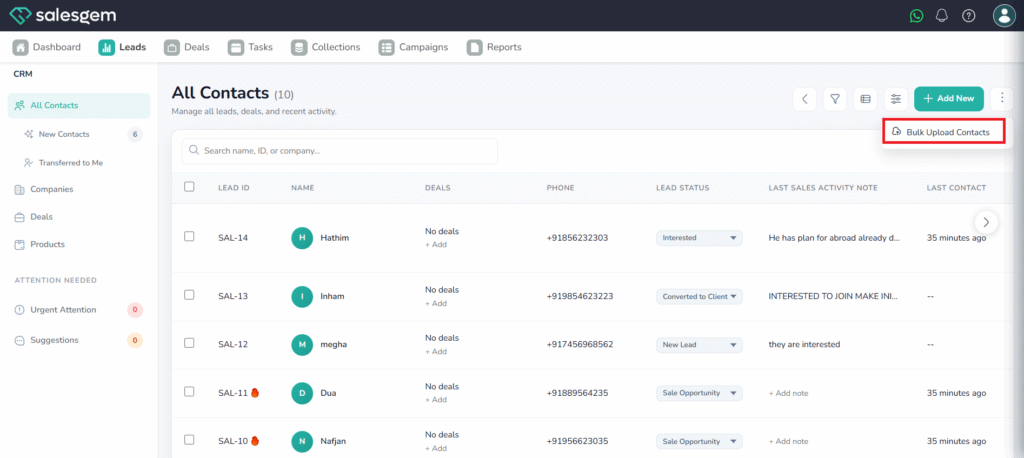
- Click upload bulk leads.
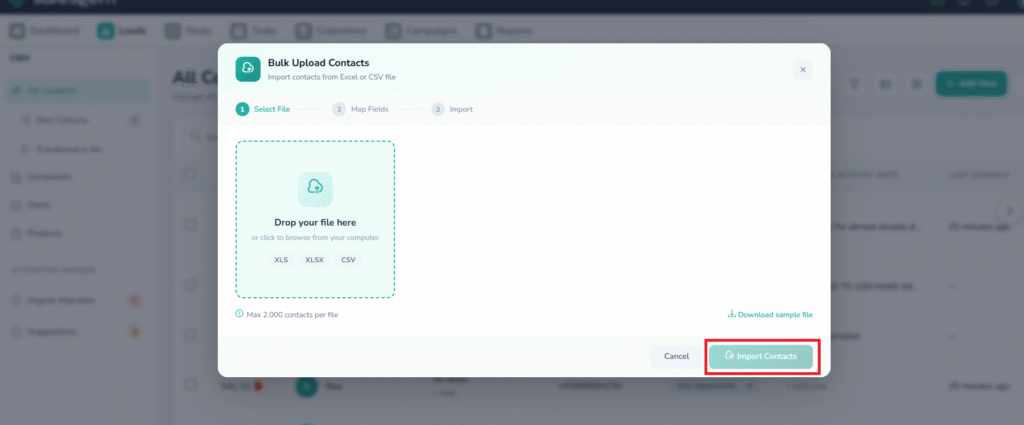
- Upload your CSV file.
- Map your CSV columns to Salesgem fields.
- Click Import to finish.