What are Products in Salesgem?
In Salesgem, Products are the goods or services that a business offers to its customers. Adding products to the CRM helps businesses maintain and organize information about what they sell and connect products with their sales activities and customer requirements.
How are Products useful to us?
Products are useful for organizing the products or services offered by the business and managing customer interest more effectively. For example, if a real estate company sells different properties, it can add each property as a product in Salesgem, such as a 2 BHK apartment, 3 BHK apartment, or villa. When a lead shows interest in a particular property, the sales team can identify the product the customer is interested in and manage the sales process accordingly. This helps the team understand customer requirements, manage product-related sales activities, and track sales more efficiently.
Steps:
- Log in to your Salesgem account.
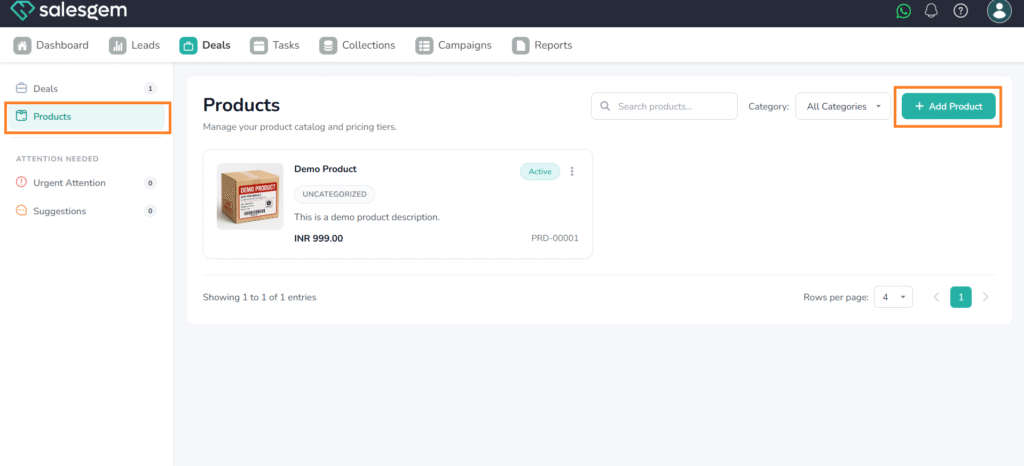
- click on Deals
- choose Products
- Click on Add products.
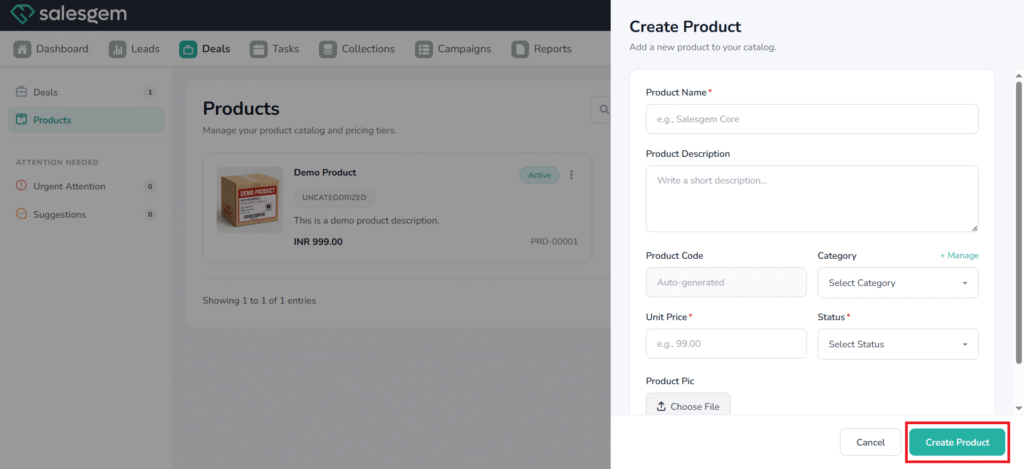
5. Add product name, product description, add Category and unit price and select status Active/inactive.
6. If needed, we can add a product photo
7. Create Product